
Codec choice
AV1 vs HEVC vs H.264
A practical codec comparison focused on compatibility, file size, encode speed, compute cost, and where the video will actually be watched.
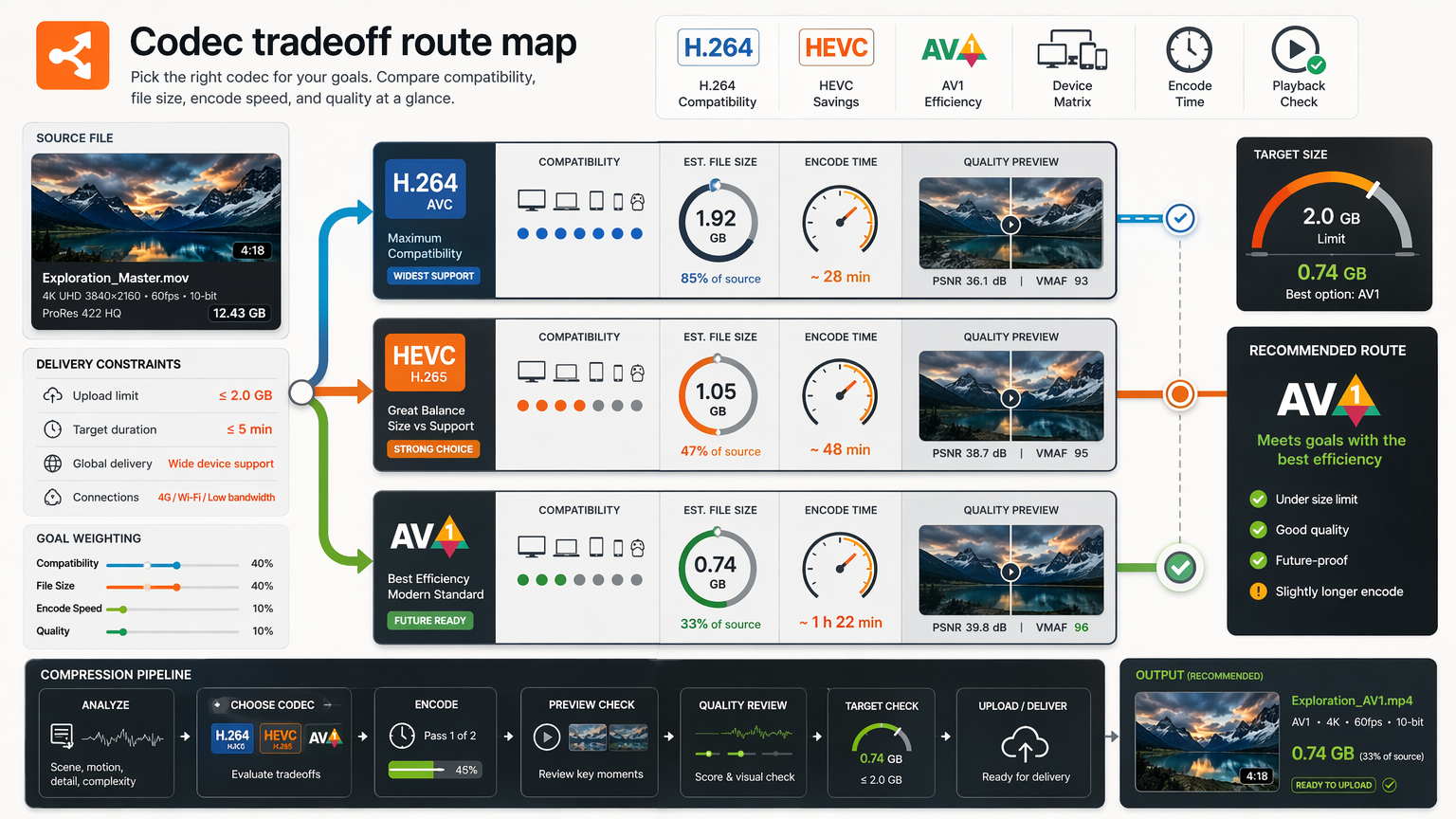
Codec comparisons usually read like spec sheets: efficiency percentages, feature flags, a winner crowned. That framing is misleading, because the best codec is never the one with the best numbers on paper, it is the one that plays on the viewer's device, finishes encoding before the deadline, and lands small enough for the delivery channel. The codec is a means; the destination is the end.
This comparison treats H.264, HEVC, and AV1 as tools chosen by context: where the video is watched, how much you can spend on encode, how many times the file will be served, and what failure you can least afford. The goal is not to name a champion but to give you the logic for picking the right codec for each job, and for keeping a fallback when the efficient choice will not play.
Section 1Start with the viewer, not the codec
Before efficiency matters, playback matters. A codec your viewer's device cannot decode produces a black screen and a support ticket, regardless of how small the file is. So the first question is never "which codec is most efficient" but "what will the audience actually be able to play."
Audiences are heterogeneous. An open-web embed might hit Chrome, Safari, a locked-down corporate browser, an old Android, and a smart TV in the same hour. A download sent by email might be opened on anything. Each of those has a different decoder baseline, and the codec choice has to clear the lowest one that matters, or provide a fallback for the rest.
This reorders the usual priorities. Compatibility comes first, because a file that does not play has zero value. Then size, then encode cost, each traded against the others. Starting from the viewer keeps the decision honest; starting from the spec sheet is how teams ship files nobody can open.
If you remember one test, it is this: name the single device or browser you are least sure about, and confirm the codec plays there. A clip that works on your laptop and your phone but not on a client's locked-down corporate browser has failed the only test that mattered, however impressive its efficiency number was on paper.
Section 2Use H.264 when playback uncertainty is high
H.264, also called AVC, is the interoperability floor of video. Its baseline and main profiles decode on essentially every browser, phone, set-top box, and editing tool made in the last fifteen years, including legacy and locked-down environments nothing else reaches. When you cannot predict or control the viewer's device, H.264 is the safe default.
Its weakness is efficiency: at a given quality level it needs roughly twice the bitrate of HEVC and several times that of AV1. For email attachments, downloads, internal communications, and any one-to-one send where compatibility is paramount, that trade is almost always worth it. The cost is a larger file; the benefit is that it plays everywhere.
The container matters as much as the codec here. H.264 inside an MP4 with AAC audio is the combination most likely to open cleanly in an email client, a default media player, or an old phone. The most efficient codec in an exotic container still fails; H.264 in MP4 rarely does.
So when a colleague says "just send me the file" and you have no idea what they will open it on, the answer is H.264 in an MP4. It may be larger than an AV1 version would be, but it will play, on their work laptop, their kid's tablet, the conference-room PC, without a follow-up email asking why the video is a black screen.
Use HEVC when modern device playback is likely
HEVC, or H.265, roughly halves the bitrate of H.264 at similar perceived quality, which is a real saving when files are large or bandwidth is tight. Modern phones, tablets, and many laptops decode it in hardware, so playback is smooth where it is supported. For a known, modern audience it is a strong choice.
The catch is support on the open web. HEVC playback in browsers is uneven: Safari handles it well, Chrome and Edge depend on the underlying operating system, and some configurations will not play it at all. Licensing has historically complicated it too. HEVC is excellent when you control the playback environment; it is a gamble when you do not.
The right pattern is to use HEVC where you can verify the audience and pair it with an H.264 fallback where you cannot. That often means an adaptive stream with multiple representations, or a download defaulted to H.264 with HEVC as an optional smaller file. HEVC's efficiency is worth claiming, just not at the cost of a viewer seeing nothing.
A realistic use: HEVC for the iOS app audience you know has hardware decode, where a 200-megabyte master becomes a tidy 60-megabyte file that still looks clean. Do not make that same HEVC file the public download link, because a chunk of desktop browsers will refuse it. Same codec, two audiences, two different answers.
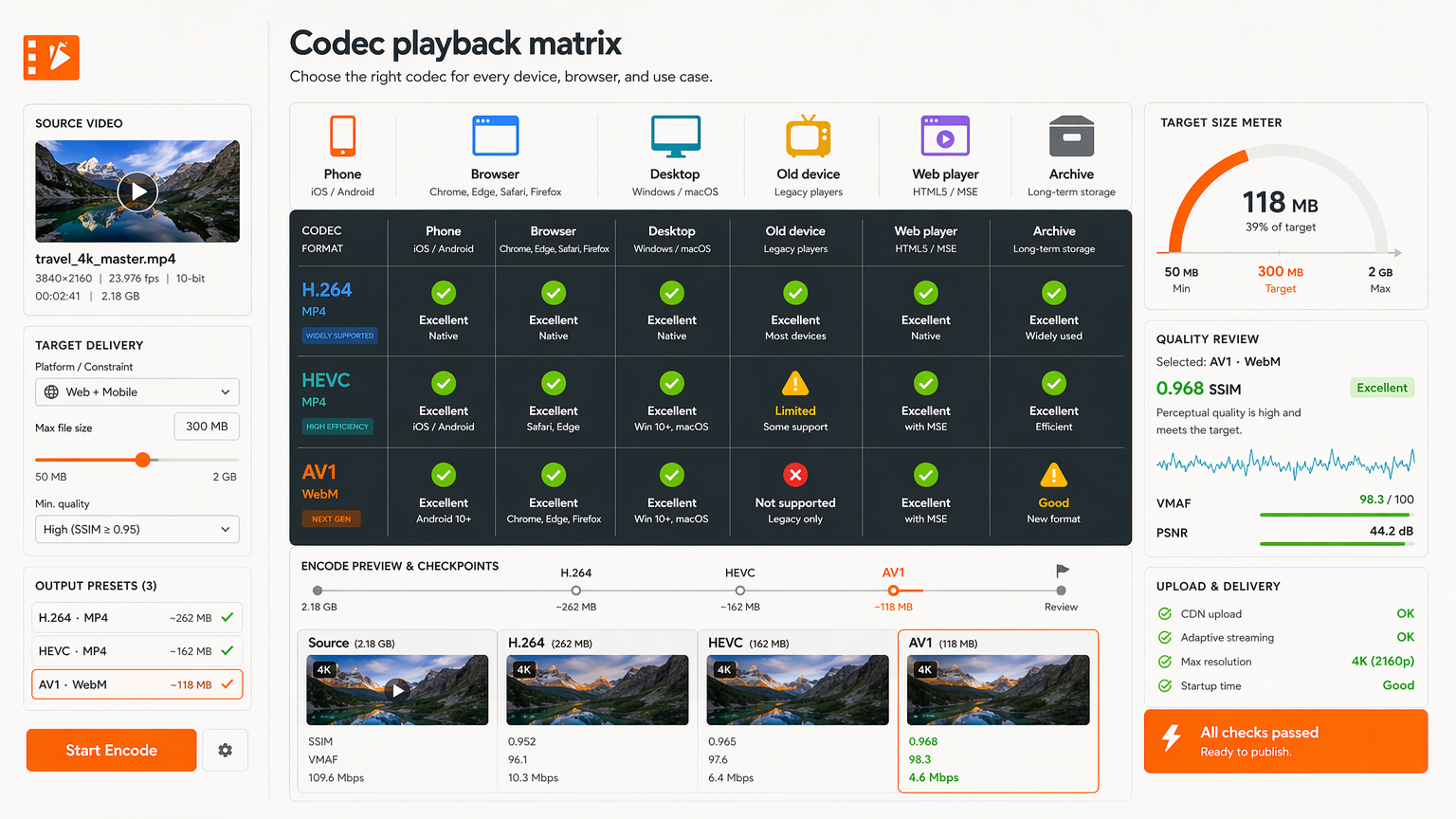
Use AV1 when repeated savings justify compute
AV1 is the newest of the three and the most efficient, delivering meaningful additional savings over HEVC at the same quality. Browser support has grown quickly, with modern Chrome, Firefox, and Edge decoding it, and recent Safari versions adding it. For high-volume web delivery, AV1's efficiency translates directly into lower bandwidth bills.
The cost is encode time. Software AV1 encoding is slow compared with H.264 and HEVC, which matters when you need fast turnaround on one-off jobs. AV1 earns its place when a file is served many times, where the encode cost is paid once and the bandwidth saving repeats, or when you have hardware encoders that bring the time down. For a single send-it-once clip due in ten minutes, it usually does not.
Treat AV1 as an investment, not a default. Where the economics work, large audiences, repeated views, CDN cost you want to cut, it is the right tool. Where the job is small, urgent, or one-off, the encode cost overwhelms the saving. Efficiency is only efficient when the total cost, including compute and time, is lower.
The decision hinges on serving multiples. A product video streamed to a hundred thousand viewers justifies a slow AV1 encode, because the bandwidth saving repeats on every view and dwarfs the one-time encode cost. That same video, exported once for a single investor email, is better off as a fast H.264, the AV1 efficiency never gets a chance to pay back the extra encode time.
Section 5Compare size against encode time
A smaller file is not free. Moving from H.264 to HEVC to AV1 generally buys better compression at the cost of more encode time and more compute. The real comparison is total cost: the storage and bandwidth you save over the life of the file, minus the time and money you spend producing it. Sometimes the slower codec wins; often it does not.
Think in serving multiples. A video streamed a hundred thousand times justifies a slow, efficient encode, because the bandwidth saving repeats on every view. The same video sent once to one recipient does not; the extra encode time is pure cost with no return. The right codec depends on how many times the file will be read.
This is also a workflow constraint, not just a budget one. A newsroom clip that has to ship in five minutes cannot wait on a multi-pass AV1 encode, even if the file would be smaller. Build the decision around the deadline and the audience size, then pick the codec that fits both, rather than optimising size in a vacuum.
Put a number on it: if a clip will be served fifty thousand times, shaving two megabytes per view with AV1 saves a hundred gigabytes of egress, easily worth a longer encode. If it will be downloaded once, those same two megabytes save nothing, and the minutes spent on the slow encode are just delay. The audience size, not the codec spec, decides whether efficiency is worth its cost.
Keep web and download fallbacks separate
Different delivery channels have different constraints, and trying to serve all of them from one file is how you get a compromise that satisfies none. Web playback can use adaptive streaming with modern codecs and graceful fallbacks; a download or an email attachment needs a single self-contained file that plays anywhere. Treat them as separate derivatives from one master.
A practical setup keeps an H.264 MP4 as the universal download and offers a modern codec, HEVC or AV1, for web embedding where you control the player. The download optimises for "opens everywhere"; the web stream optimises for efficiency with a safety net. One source, two purposes, no single file stretched beyond its strengths.
This also simplifies decisions later. When a channel's constraint changes, a new browser, a new device, a new limit, you adjust that one derivative, not a do-everything file. Separating fallbacks is more work up front and far less work every time something shifts.
Think of it as one master producing a small family of outputs: an H.264 MP4 for downloads and email, an AV1 or HEVC stream for the in-page player, maybe a lower-resolution variant for slow connections. Each is tuned to its channel's real constraint, and when a new device or limit appears, you add or adjust one member of the family instead of rebuilding a single compromised file.
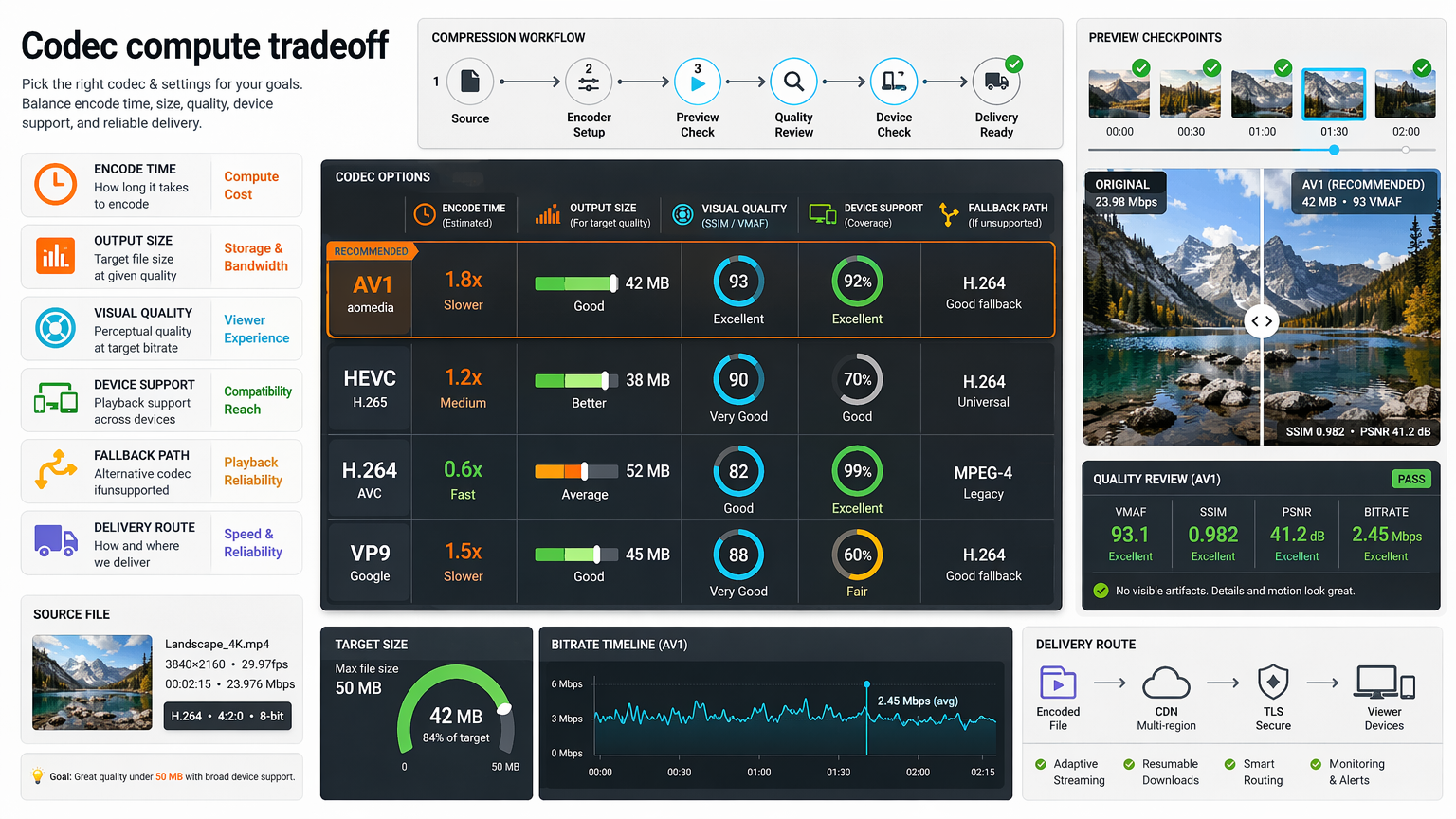
Preview source-specific artifacts
Codec comparisons on paper assume average content, and almost no real footage is average. Grain, fast motion, fine text, skin tones, and dark gradients each stress encoders differently, and a codec that wins on a test chart can lose on your specific clip. The only reliable comparison is on the actual source you intend to ship.
Encode a short, representative section, the hardest one, with each candidate codec at a comparable quality target, and look at them side by side on the target device. You will often find that the efficiency ranking from the spec sheet does not hold on your footage, or that one codec preserves the detail you care about while another smears it.
This is the same preview-first instinct from the rest of the workflow, applied to codec choice. Do not commit a full encode to settle a codec question; spend a few seconds of preview per option and let the source decide. The clip in front of you is always a better guide than the benchmark.
A common surprise: a grainy low-light clip where AV1 preserves the grain naturally while a same-bitrate H.264 version turns it into flat blocks, or a screen-recording where H.264 keeps text crisper than an aggressive HEVC encode. You only learn which by previewing each codec on your footage, the generic ranking would have sent you the wrong way.
Section 8Translate codec choices into user presets
Most users do not want a codec menu; they want an outcome. "Make this small enough to email," "optimise for web," "keep maximum quality for archive", these are the decisions people actually make, and the codec, container, bitrate, and resolution are implementation details that serve them. Hide the complexity behind presets named after the outcome.
A good preset bundles the whole decision: the codec matched to the channel, a sensible quality target, the right container, and a fallback where needed. The user picks the intent; the preset applies the expertise. This is what makes compression feel easy without throwing away the careful choices underneath.
Presets also keep quality consistent across a team. When everyone uses the same "web" preset, outputs are predictable and problems are reproducible. The codec logic still lives in the system, it is just expressed once, in the preset, instead of re-decided by every user on every upload.
A preset named "Email-friendly" quietly selects H.264 in MP4, targets a size under the common attachment caps, and trims silence, three expert decisions the user never has to make. "Web stream" might select a modern codec with an H.264 fallback and an adaptive ladder. The user picks the goal; the codec expertise is baked in and identical for everyone on the team.
Compression decision checklist
- Use H.264 for broad compatibility
- Use HEVC for modern device workflows
- Use AV1 when efficiency justifies slower processing
- Keep fallbacks for web delivery
- Preview the real source before final render
There is no universal winner among H.264, HEVC, and AV1, only the right tool for a known audience, deadline, and delivery channel. Start from the viewer and the decoder they actually have, weigh size against the encode time and compute you can spend, keep a fallback for the cases your efficient choice will not cover, and verify every claim on the real source rather than a benchmark. Let destinations pick their own derivatives from one master, and hide the codec complexity behind presets named after outcomes. That is how efficiency becomes a genuine saving instead of a broken playback.